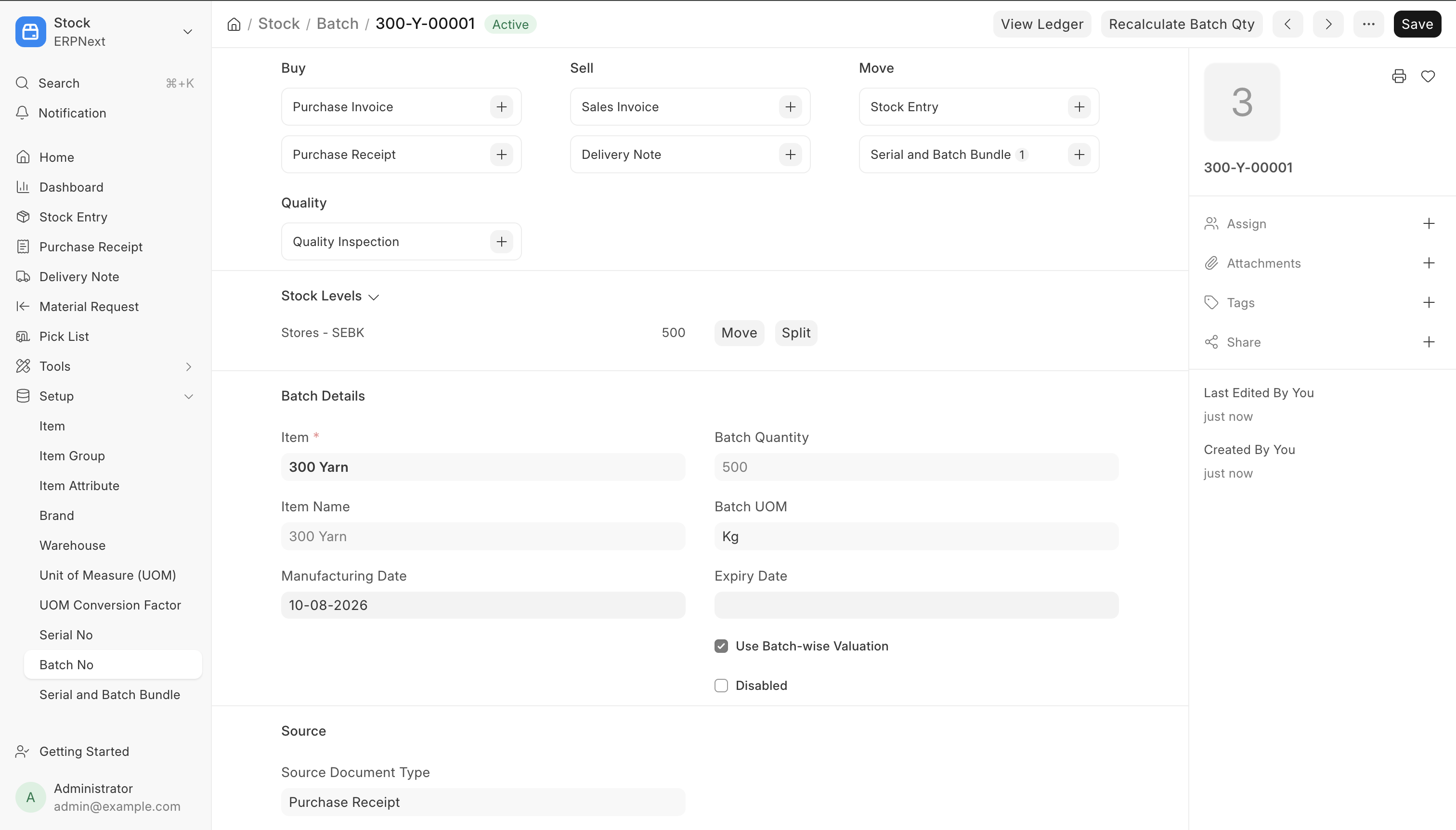
If you deal with products that have expiry dates, quality variations between production runs, or need to be recalled and traced back to a specific lot — you need batch tracking. ERPNext’s Batch Item feature is built exactly for this, and after implementing it across textile, manufacturing, and trading businesses, I want to walk through what it actually does, where it fits, and where teams commonly trip up.
What Is a Batch Item in ERPNext?
A Batch in ERPNext is a group of stock units of the same item that were produced or received together, and are tracked as a single unit for traceability purposes. Instead of tracking every individual unit, you track lots — say, “Batch 2026-08-A” of 500 meters of fabric, or “Batch LOT-1123” of a chemical compound.
This is different from Serial Numbers, which track each individual unit separately (useful for electronics, machinery, anything with a unique identity). Batches are for when items in the same production run behave identically and can be tracked as a group.
When You Actually Need Batch Tracking
Not every item needs this — enabling it everywhere adds overhead without benefit. It’s worth the setup when:
- Expiry matters: pharmaceuticals, food products, chemicals, adhesives — anything with a shelf life
- Quality varies by production run: textile dye lots, chemical formulations, anything where one batch might differ slightly from the next
- Regulatory traceability is required: if a customer complaint or recall means you need to trace exactly which raw material lot went into which finished goods
- You buy/sell in lots: diamond parcels, raw material shipments that arrive and get consumed as discrete lots
If none of these apply to an item, skip it — batch-enabled items add a mandatory selection step at every stock transaction, which slows down data entry for no real benefit.
Setting It Up
1. Enable batching on the item
Go to the Item master → check “Has Batch No”. You’ll also see an option “Create New Batch” — if checked, ERPNext auto-generates a batch on receipt (useful for manufacturing output); if unchecked, you assign batch numbers manually (useful when batch numbers come from a supplier or a physical lot tag).
2. Decide your batch numbering series
ERPNext lets you either auto-generate batch IDs using a naming series, or let the user enter batch numbers manually. For raw materials received from suppliers who already assign lot numbers, manual entry preserves traceability back to the supplier’s own system. For in-house manufacturing output, an auto-generated series (like BATCH-.YYYY.-.#####) is cleaner.
3. Expiry tracking (optional but common)
If the item has a shelf life, set “Has Expiry Date” and a “Shelf Life in Days” on the item. ERPNext will then calculate and store the expiry date per batch when it’s created, and you can filter/report on items nearing expiry — critical for food, pharma, and chemical businesses to avoid selling expired stock.
How Batches Flow Through Transactions
Once enabled, every stock transaction for that item requires a batch selection:
- Purchase Receipt: assign or auto-generate the batch as goods come in
- Stock Entry (Manufacture): raw material batches get consumed, and the finished good gets a new batch number — this is where batch-wise traceability really pays off, since you can trace a finished batch back to exactly which raw material batches went into it
- Delivery Note / Sales Invoice: you select which batch to ship from, and ERPNext respects FIFO/batch-wise valuation if configured
- Stock Reconciliation: batch-wise quantities need to be reconciled individually, not just at the item level
Batch-Wise Valuation
This is where teams sometimes get tripped up. ERPNext supports valuation at the batch level, meaning each batch can carry its own cost — important if your raw material costs fluctuate between purchase lots (common in commodities, textiles, metals). If you don’t need this level of precision, the item-level moving average or FIFO valuation still applies across all batches combined; batch-wise valuation is an added layer, not a requirement.
A Real Traceability Example
In one manufacturing setup I worked on, the requirement was: if a customer complaint comes in about a finished product, we need to know within minutes which raw material batch caused it. With batch tracking properly configured through the Stock Entry (Manufacture) step, this became a direct lookup — the finished batch’s linked raw material batches show up in the stock ledger, no manual cross-referencing needed. Without batch tracking, that same lookup would have meant digging through purchase and production records manually, which for a recall situation is far too slow.
Common Pitfalls
- Enabling batch tracking after stock already exists: existing stock won’t retroactively have batch numbers assigned. Plan batch tracking before you have live inventory on an item, or do a careful stock reconciliation to backfill batches.
- Mixing batch-tracked and non-tracked items in the same category without a clear policy: decide item-by-item, not by product category, since some SKUs in the same category may not need it.
- Ignoring expiry alerts: ERPNext can flag near-expiry stock, but only if Shelf Life is actually configured — many implementations skip this and lose the main benefit of expiry tracking.
- Not training warehouse staff on batch selection during Delivery Note creation: if staff default to “whichever batch shows first,” you lose FIFO/expiry-based dispatch discipline, which defeats the purpose of tracking it in the first place.
Should You Use Batch or Serial, or Both?
For some items — high-value electronics manufactured in production runs, for instance — you may want both: a batch to track the production run, and serial numbers for individual unit identity within that batch. ERPNext supports this combination, though it’s worth implementing carefully since it adds complexity to every stock movement.
If you’re setting up ERPNext for a manufacturing or trading business and are unsure whether batch tracking fits your workflow — or you’re dealing with multi-level traceability requirements (raw material batch → production batch → finished goods batch) — this is exactly the kind of configuration decision that’s easy to get wrong on a first implementation. Happy to help you think through it: jigar@khatavahi.in.
ERPNext already has feature of Batch Item