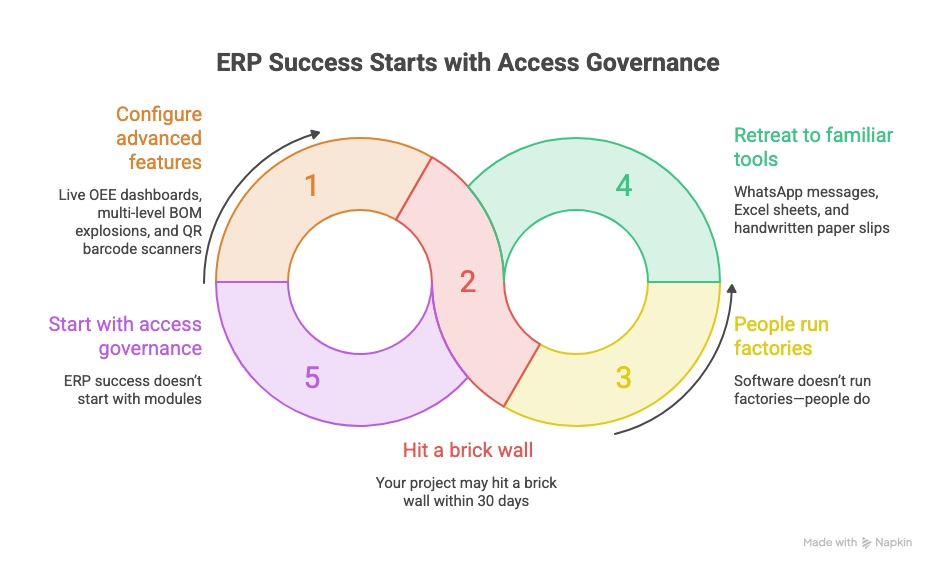
Whenever we kick off an on-site ERP implementation at a manufacturing plant—whether it’s an automotive component manufacturer in Surat, a precision engineering facility, or a continuous-process unit—leadership is quick to ask about the same advanced features:
“Can we see live OEE dashboards on loom machines?”
“Can ERPNext automatically generate multi-level BOM explosions and raw-material requisitions?”
“Can we track operator Job Cards with QR barcode scanners?”
The answer to all three is an emphatic yes. But if you begin your ERP journey by configuring Work Orders and Bills of Materials, your project may hit a brick wall within 30 days.
Why? Because software doesn’t run factories—people do.
If shop-floor, stores, and QA staff log in on Day 1 and find 30 confusing menu icons, permission errors, or a cluttered interface that looks like a spaceship cockpit, they’ll retreat to what they know: WhatsApp messages, Excel sheets, and handwritten paper slips.
Here’s the unfiltered truth from our implementation field notes: ERP success doesn’t start with modules. It starts with access governance.
1. The “Cart-Before-the-Horse” Trap in Manufacturing ERPs
In 70% of failed manufacturing ERP rollouts, the failure isn’t caused by a software bug. It’s caused by a governance void.
Typically, one of two extremes occurs:
- The “System Manager for Everyone” trap: To avoid permission errors during testing, the IT manager gives supervisors and storekeepers broad administrative privileges. Two weeks later, a junior supervisor may accidentally cancel a submitted stock entry, alter a standard costing rate, or view confidential executive payroll records.
- The “Cognitive Overload” trap: A storekeeper logs into ERPNext and finds workspaces for CRM, HRMS, Projects, Asset Management, and Payroll cluttering the screen. With so much visual noise, finding the “Purchase Receipt” button feels like searching for a needle in a haystack.
To build an ERP system that your factory floor will actually adopt, invert the pyramid. Before creating a single Item Master or posting an inventory entry, establish an ironclad access governance architecture.
2. The Three-Tier Access Pyramid in Frappe / ERPNext
At Khatavahi BI Solutions, we use a structured three-tier access model designed for manufacturing enterprises:
┌────────────────────────────────────────────────────────────────────────┐
│                   THE FACTORY ACCESS GOVERNANCE PYRAMID                │
│                                                                        │
│   TIER 1: USER IDENTITY        ──> Unique identity, mobile login,       │
│                                    localization & session security     │
│             │                                                          │
│             ▼                                                          │
│   TIER 2: ROLE PROFILES        ──> Functional permission bundles       │
│                                    (No loose, unmanaged roles)         │
│             │                                                          │
│             ▼                                                          │
│   TIER 3: MODULE PROFILES      ──> Cognitive isolation (only permitted │
│                                    departmental workspaces are visible)│
└────────────────────────────────────────────────────────────────────────┘
Tier 1: User Identity & Indian Localization
- Mobile-first login: Shop-floor supervisors often don’t have corporate email addresses. Standardizing login identifiers to accept both 10-digit Indian mobile numbers and corporate email addresses gives everyone a verifiable, auditable identity.
- Set Indian system defaults from Day 1:
- Timezone:
Asia/Kolkata(+05:30), so machine-maintenance logs match shift times. - Date format:
dd-mm-yyyy, to prevent costly month/day mix-ups on dispatch challans. - Currency and number formatting:
#,##,###.##inINR (₹), so inventory valuations display naturally in lakhs and crores.
- Timezone:
Tier 2: Role Profiles (The End of “Role Juggling”)
ERPNext includes dozens of granular, out-of-the-box roles (Stock User, Purchase Manager, Quality Inspector, and others). Manually selecting 15 individual checkboxes for each new employee invites human error.
Instead, bundle permissions into standardized Role Profiles:
Store Executive: Can create Purchase Receipts and Material Transfers; cannot view Sales Invoices or change Item standard rates.Quality Inspector: Can submit Quality Inspections and flag rejections; cannot modify Work Orders.Executive Accountant: Has full AP/AR and GST ledger access; has no access to machine-routing configurations.
Tier 3: Module Profiles (Cognitive Simplicity)
A Module Profile hides irrelevant apps from the desktop navigation, making it a powerful tool for shop-floor adoption.
When a store executive logs in, they see only Stock and Buying. HR, CRM, Accounts, and Projects don’t appear on their screen. This reduces cognitive load, shortens training time by 60%, and builds user confidence.
3. Field Notes: Inside an Automotive Fasteners Plant
During a recent on-site implementation kickoff at Welnit Industries, a Surat-based manufacturer of precision zippers and hook-and-loop (Velcro) fasteners for automotive OEMs, we put this philosophy into practice.
Manufacturing fasteners for automotive seating and interiors is a high-stakes, hybrid process involving continuous narrow-fabric tape weaving, polymer and metal teeth molding, dyeing, and multi-stage cutting and assembly. Because automotive tier suppliers must meet strict IATF standards, traceability is non-negotiable.
Here’s how we governed access on Day 1:
- Formalized six core departments:
Account,HRMS,Quality,Dispatch,Manufacturing, andStore. - Approved 21 business Role Profiles: These span executive leadership, shop-floor supervisors, IQC/IPQC/FQC inspectors, lab technicians, and logistics.
- Delegated ownership to HR—the game changer: Rather than making external IT consultants a bottleneck for user creation, we formally designated Ekta (HR Lead) as the operational owner. When Welnit hires someone, HR creates their account, selects their preconfigured Role Profile, assigns their Module Profile, and uses User Permissions to restrict access to their physical plant (Parvat Patiya or Kadodara).
- Planned access for 35 shop-floor operators: Before creating generic accounts, we identified the need to map the 35 machine operators to specific production lines (Warping, Loom Weaving, Teeth Injection, and Assembly). This prepares the team for touchscreen Job Card terminals using Factory Plus on Visit #3.
By the end of Session #2, Welnit’s leadership had more than ERP software installed on a VPS: they had a working organizational governance structure inside ERPNext.
4. The Five-Point “Day 1 Access Governance Checklist” for Factory Promoters
If you’re an MD, Plant Head, or CFO preparing to implement ERPNext in a manufacturing business, use this checklist on Day 1:
- [ ] 1. Eliminate “loose roles”: Are you creating standardized Role Profiles for every job title, or manually selecting checkboxes for every user?
- [ ] 2. Activate Module Profiles: Have you hidden irrelevant desktop workspaces for each department?
- [ ] 3. Restrict data by plant or branch: If you operate multiple units (such as Parvat Patiya and Kadodara), have you configured User Permissions so users see only transactions relevant to their facility?
- [ ] 4. Appoint an internal user-provisioning owner: Is HR responsible for onboarding under a standard SOP, or does the factory grind to a halt whenever a password needs resetting?
- [ ] 5. Lock down system settings: Are timestamps, date formats (
dd-mm-yyyy), and number formats (#,##,###.##) standardized for Indian compliance and audit readiness?
Bottom Line: Build the Foundation Before the Factory Roof
An ERP isn’t just a database—it’s a digital mirror of your factory floor. If operational roles, departmental boundaries, and access rules are unclear at the plant, automating them in software will only create automated chaos.
Establish access governance on Day 1. Your shop-floor team will thank you, your auditors will appreciate it, and your go-live date will stay on schedule.
Ready to Modernize Your Manufacturing Operations?
At Khatavahi BI Solutions LLP, we specialize in practical, on-the-ground ERPNext, MES (Factory Plus), and IoT implementations for Indian discrete and process manufacturers.
👉 Looking for an ERP-readiness audit or a structured implementation roadmap?
Contact us at jigar@khatavahi.in.
📍 Visit our office: Pragati IT Park, C-2/716, Surat, Gujarat 394101.
🌐 *Explore our solutions: https://khatavahi.in/*